
CPG - Header block
Element Shortcuts
| Element shortcut | Where populated | Owner |
|---|---|---|
| Course Title | IPP | Course Publication Team |
| Year of entry | IPP | Course Publication Team |
| Header image | T4 | Marketing Practitioners |
| CTA Button - How to apply | Global | Central Marketing/Web Team |
| CTA Button - Order a prospectus | Global | Central Markeitng/Web Team |
| CTA Button - Study Fairs | Global | Central Marketing/Web Team |
Course Title

| Element | Where populated | Notes/instructions | Owner | CMA Guidance |
|---|---|---|---|---|
| Course Title | IPP | This will automatically populate from the ASIS screens that CPT populate when a course is set up. | Course Publication Team | Mandatory CMA information. Updates after courses go live must be made in accordance with the CMA procedure. |
Year of entry

| Element | Where populated | Notes/instructions | Owner | CMA Guidance |
|---|---|---|---|---|
| Year of entry | IPP | This will automatically populate if a course is made available for a specific year of entry. | Course Publication Team | Mandatory CMA information. Updates after courses go live must be made in accordance with the CMA procedure. |
Header image
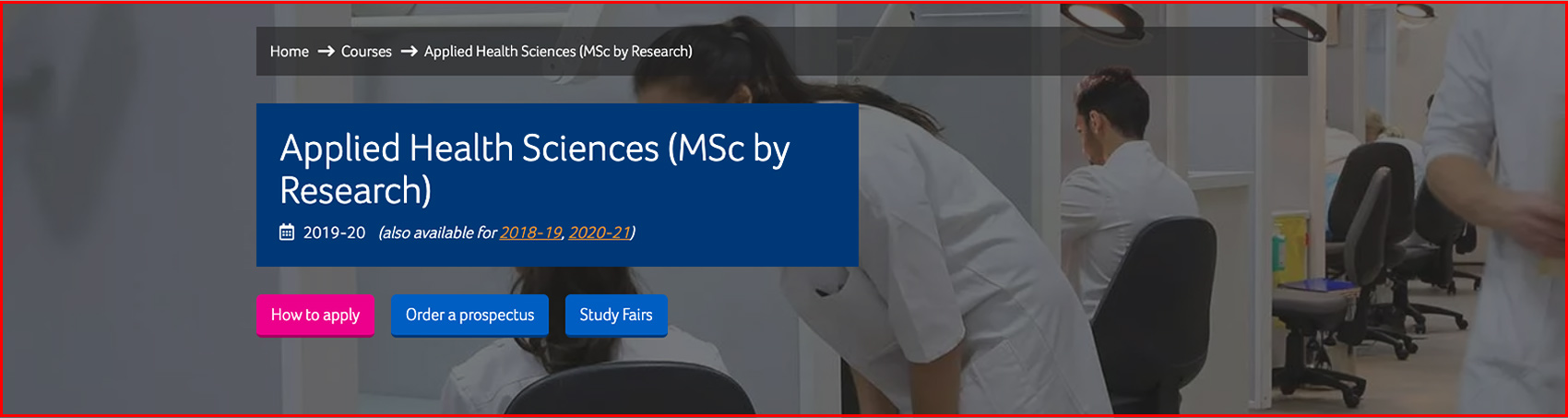
| Element | Where populated | Notes/instructions | Owner | CMA Guidance |
|---|---|---|---|---|
| Header image | T4 |
The Course Header Image content type has the following elements: • Name – the internal T4 name • Image – the image to use (you don’t need to fade it to grey – course finder will do that for you) • Header image dimensions - 1920 x 1080px (file size under 300kb) |
Marketing Practitioners | Not affected by CMA |
CTA Button - How to apply

| Element | Where populated | Notes/instructions | Owner | CMA Guidance |
|---|---|---|---|---|
| CTA Button - How to apply | Global |
Will link to PGR 'How to apply' pages, which will be set up by Central Marketing. If you have course specific 'How to apply' info for a course that is not covered on the general webpage, you could place this advice at the bottom of the 'About the research degree' section. Link: https://research.hud.ac.uk/research-degrees/how-to-apply/?fc=20 |
Central Marketing/ Web Team | N/A |
CTA Button - Order the prospectus

| Element | Where populated | Notes/instructions | Owner | CMA Guidance |
|---|---|---|---|---|
| CTA Button - Order a prospectus | Global |
Will link to the prospectus order form in Achiever. |
Central Marketing/ Web Team | N/A |
CTA Button - Study Fairs

| Element | Where populated | Notes/instructions | Owner | CMA Guidance |
|---|---|---|---|---|
| CTA Button - Study Fairs | Global |
Will link to the PG Study Fair webpage. |
Central Marketing/ Web Team | N/A |
Landing page
Go to the Coursefinder Population Guide Landing page
Keywords and Metadescription
Go to the Coursefinder Population Guide Keywords and Metadescription page